If you work in emergency medical services, fire and rescue, hospital care, or public safety, ESO Suite is a name you may encounter when managing clinical records, operational data, personnel information, reporting, and compliance. ESO Suite is a cloud-based ecosystem designed to bring multiple healthcare and public-safety workflows together rather than forcing organizations to manage disconnected systems.
The platform is particularly relevant to organizations using ESO products for electronic health records, EMS documentation, fire incident management, personnel management, analytics, and related operational functions. Its goal is straightforward: make critical information easier to capture, manage, analyze, and share while helping organizations improve efficiency and decision-making.
What Is ESO Suite?
ESO Suite is an integrated software environment developed by ESO for organizations involved in EMS, fire service, hospitals, and related healthcare operations. Instead of treating every operational function as an isolated application, the platform connects multiple ESO products through a shared ecosystem.
Depending on an organization’s needs and subscription, users may work with applications covering areas such as:
- Electronic Health Records (EHR)
- EMS electronic patient care reporting
- Fire incident documentation
- Personnel management
- Scheduling and workforce processes
- Assets, inventory, and preventive maintenance
- Patient registry
- Data and analytics
- Quality management
- Reporting and insights
This integrated approach is important because emergency-service organizations generate large amounts of information every day. Connecting those workflows can reduce duplicate data entry and make operational information more useful across departments.
ESO Suite at a Glance
| Feature | What It Provides |
|---|---|
| Platform type | Cloud-based software ecosystem |
| Primary users | EMS, fire, hospital, and healthcare organizations |
| Core purpose | Data management, documentation, reporting, and operational workflows |
| EHR capabilities | Electronic clinical documentation and patient records |
| Analytics | Dashboards, reporting, and data analysis |
| Administration | User, agency, and system management |
| Access | Web-based access with organization credentials |
| Security | Cloud infrastructure and access controls |
| Integrations | Connections between ESO products and external systems |
Key ESO Suite Features
The biggest advantage of the platform is not necessarily one individual feature. Its value comes from bringing multiple operational processes into a connected environment.
1. Electronic Health Records
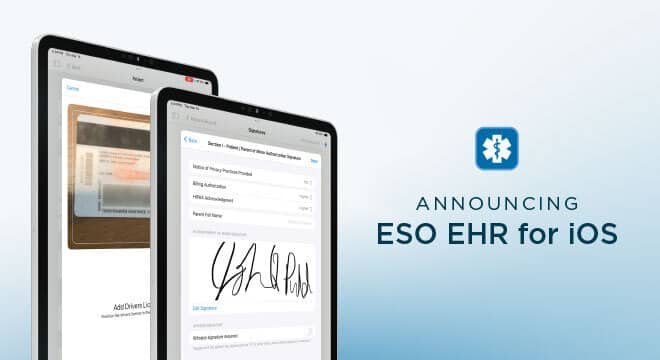
The EHR component supports electronic clinical documentation for EMS organizations. Providers can record patient information, assessments, treatments, medications, procedures, and other details required for patient care documentation.
ESO’s documentation tools have also expanded with features designed to reduce repetitive administrative work. For example, ESO introduced an AI-powered Auto-Generated Narrative capability in EHR, reporting substantial adoption during its initial launch.
For organizations, the practical benefit is simple: clinicians can spend less time manually constructing repetitive documentation and more time focusing on patient care.
2. EMS Data and Reporting
EMS agencies need more than a place to store patient records. They also need reliable data for quality improvement, compliance, operational planning, and performance measurement.
ESO Suite connects documentation with broader reporting capabilities, allowing organizations to turn collected information into useful operational insights.
This can help administrators identify patterns such as:
- Response trends
- Documentation issues
- Clinical performance
- Operational bottlenecks
- Resource utilization
- Quality-improvement opportunities
The value of reporting depends heavily on data quality. Even the best dashboard cannot compensate for incomplete, inconsistent, or poorly structured information.
3. Fire Incident Management
ESO also serves fire organizations with tools for incident reporting and related operational processes. Fire departments can use digital workflows to manage information associated with incidents, properties, inspections, hydrants, and other activities.
ESO has continued developing its fire capabilities around evolving industry requirements, including NERIS-related functionality.
This is especially useful for departments that want operational and compliance data in a centralized environment rather than relying on spreadsheets and disconnected databases.
4. Personnel Management
Managing emergency-service personnel involves more than maintaining a list of employees. Organizations may need to track qualifications, schedules, compensation information, roles, and other workforce data.
ESO Suite includes personnel-management capabilities intended to centralize these processes. ESO has also expanded its self-service onboarding tools to help new customers configure personnel management and import relevant records.
For administrators, centralized personnel data can make routine management easier and reduce the need to maintain duplicate records in multiple systems.
5. Data Analytics and Insights
Data becomes considerably more valuable when organizations can analyze it rather than simply store it.
ESO’s analytics and Insights capabilities are designed to help customers work with information generated across their applications. Depending on the products in use, organizations can examine operational and clinical data through dashboards, reports, filters, and other analytical tools.
Recent product updates have also highlighted improvements involving dashboards, Query Builder functionality, reporting, filtering, and data integration.
6. Feedback and Product Roadmaps
One feature that can be easy to overlook is ESO’s approach to customer feedback. ESO has introduced in-app mechanisms allowing administrators to submit enhancement ideas directly to product teams.
The company has also added visibility into product roadmap stages, giving customers more insight into features being developed or considered.
For enterprise software, this matters because customer workflows can vary significantly between agencies. A feedback-driven development process can help prioritize improvements that address real operational problems.
How to Log In to ESO Suite
Accessing ESO Suite generally requires credentials provided by your organization. ESO documentation indicates that users can access the platform through a web browser and enter their username, password, and agency name. Organizations may also have multi-factor authentication enabled.
A typical login process is:
- Open the ESO Suite login page provided by your organization or ESO.
- Enter your username.
- Enter your password.
- Provide the required agency information if prompted.
- Complete multi-factor authentication if your organization requires it.
- Select the appropriate application or module after signing in.
If you cannot log in, avoid repeatedly guessing passwords. Check whether your credentials are correct and contact your organization’s ESO administrator or authorized support channel if the problem continues.
ESO Suite Login Problems: Common Causes
Login issues do not always mean that the platform itself is unavailable. Several common problems can prevent successful access.
Incorrect credentials
A mistyped username or password is one of the simplest causes. Remember that passwords are usually case-sensitive.
Incorrect agency information
Some ESO Suite environments require agency identification during authentication. Entering the wrong agency information can prevent access even when the username and password are correct.
Multi-factor authentication problems
If MFA is enabled, users may need access to the authentication method configured by their organization. A missing or expired verification method can interrupt the login process.
Browser problems
Outdated browsers, cached data, disabled cookies, or extensions can sometimes interfere with web applications. Trying an updated browser or a private browsing window can help determine whether the issue is browser-related.
Account permissions
Your account may exist but lack permission to access a particular application. In that situation, an administrator may need to adjust your role or permissions.
Benefits of Using ESO Suite
Organizations generally adopt integrated platforms because they want to solve operational problems, not simply because they want another software subscription.
Centralized information
A connected platform can reduce the number of places employees need to search for information. This is particularly valuable in organizations where clinical, operational, personnel, and reporting workflows overlap.
Less duplicate data entry
When systems share information appropriately, employees may not need to repeatedly enter the same information into separate applications.
Better reporting
Centralized data can make it easier to identify trends and generate reports for managers, quality-improvement teams, and other stakeholders.
Improved workflow visibility
Administrators can gain a clearer picture of what is happening across different areas of the organization rather than viewing each department independently.
Scalable functionality
Organizations can use the products and modules that match their operational requirements instead of necessarily deploying every available capability at once.
ESO Suite vs. Standalone Software
A useful way to evaluate ESO Suite is to compare an integrated ecosystem with a collection of unrelated applications.
| Area | Integrated ESO Approach | Separate Software Tools |
|---|---|---|
| Data sharing | Designed around connected ESO products | May require custom integrations |
| User experience | Common ecosystem | Different interfaces and workflows |
| Reporting | Centralized analytical capabilities | Data may be scattered |
| Administration | Consolidated environment | Multiple administrative systems |
| Training | Shared platform concepts | Separate training for each tool |
| Data duplication | Potentially reduced | More likely across disconnected systems |
| Customization | Depends on ESO products and configuration | Varies by vendor |
| Neither approach is automatically better for every organization. A smaller department with very limited requirements may prefer a specialized application, while a larger organization may benefit more from an integrated ecosystem. |
Is ESO Suite Right for Your Organization?
The answer depends on your organization’s size, workflows, existing technology, and goals.
ESO Suite may be worth evaluating if you need:
- EMS electronic documentation
- Fire incident management
- Healthcare data management
- Personnel administration
- Integrated reporting
- Operational analytics
- Multiple connected applications
- Cloud-based access
However, organizations should evaluate the platform against their actual requirements rather than purchasing software based only on its feature list.
Before making a decision, identify your most important workflows and determine whether the platform supports them efficiently.
What to Check Before Adopting ESO Suite
A thorough evaluation should go beyond a product demonstration.
Review your existing workflows
Document how information currently moves from field providers to administrators, hospitals, billing teams, compliance personnel, and leadership.
Evaluate integrations
Ask which systems can connect with your existing environment and what information can be exchanged automatically.
Examine reporting requirements
Make a list of the reports your organization actually uses. Then determine whether the available dashboards and reporting tools can produce the required information without excessive manual work.
Consider training
A powerful system still creates problems if employees cannot use it effectively. Ask about implementation, training, documentation, and ongoing support.
Review security and access controls
Because healthcare and public-safety organizations handle sensitive information, administrators should carefully evaluate authentication, permissions, data handling, hosting, and organizational security requirements.
Measure implementation effort
Migration, configuration, training, integrations, and process changes can require significant time. Estimate the total implementation workload instead of focusing only on software functionality.
Common ESO Suite Mistakes to Avoid
One of the biggest mistakes is treating implementation as a technology project only. Successful adoption usually requires operational planning as well.
Avoid these common problems:
- Giving users more permissions than they need
- Failing to establish consistent data-entry standards
- Ignoring staff training
- Migrating inaccurate or duplicate records
- Building reports without defining the business question first
- Assuming every available feature must be activated
- Neglecting periodic permission reviews
- Failing to document internal workflows
Another common mistake is expecting software to solve a process that is fundamentally inefficient. Before automating a workflow, determine whether the workflow itself should be redesigned.
Recent ESO Suite Developments
ESO has continued releasing updates across its product ecosystem. Recent announcements have highlighted improvements to the login experience, dashboards, mobile responsiveness, Query Builder, reporting, customer feedback, and cross-product functionality.
The company’s product updates also show an increasing emphasis on usability, customization, data management, notifications, reporting, and integration.
This suggests that ESO Suite is not a static product. Its capabilities continue to evolve as ESO incorporates customer feedback and develops new functionality across its platform.
Frequently Asked Questions About ESO Suite
What is ESO Suite used for?
ESO Suite is used by organizations such as EMS agencies, fire departments, hospitals, and healthcare-related organizations to manage documentation, operational information, personnel workflows, analytics, reporting, and related processes.
How do I access ESO Suite?
Access is normally provided through your organization’s ESO environment. You may need a username, password, agency information, and multi-factor authentication depending on your organization’s configuration.
Is ESO Suite cloud-based?
Yes. ESO describes its suite as a software-as-a-service environment. Public documentation has described cloud hosting and architecture designed around security, availability, and data segregation.
Does ESO Suite support EMS?
Yes. EMS is one of the central areas supported by ESO’s product ecosystem, including electronic health record and electronic patient care documentation capabilities.
Can ESO Suite support fire departments?
Yes. ESO provides products and workflows for fire organizations, including incident-related functionality and evolving NERIS-related capabilities.
Does ESO Suite provide analytics?
Yes. ESO offers analytics and reporting capabilities designed to help organizations turn operational and clinical data into actionable information.
What should I do if I cannot log in?
Verify your credentials and agency information, check whether MFA is functioning, and try an updated browser. If the issue persists, contact your organization’s ESO administrator or authorized support channel.
Final Thoughts on ESO Suite
ESO Suite is best understood as an interconnected technology ecosystem rather than a single-purpose application. Its strongest value comes from bringing documentation, operations, personnel management, analytics, reporting, and related workflows into a broader platform.
For EMS agencies, fire departments, hospitals, and other organizations managing complex operational data, that integration can reduce fragmentation and provide a stronger foundation for informed decision-making. At the same time, successful implementation depends on configuration, training, data quality, security practices, and clearly defined workflows.
If you’re evaluating ESO Suite, focus less on how many features the platform offers and more on whether those features solve your organization’s real problems. A well-planned implementation can turn an enterprise software platform from another administrative requirement into a practical tool for improving efficiency, data visibility, and service delivery.